
It seems that spelling and grammar checking in Microsoft Word might use some improvement.
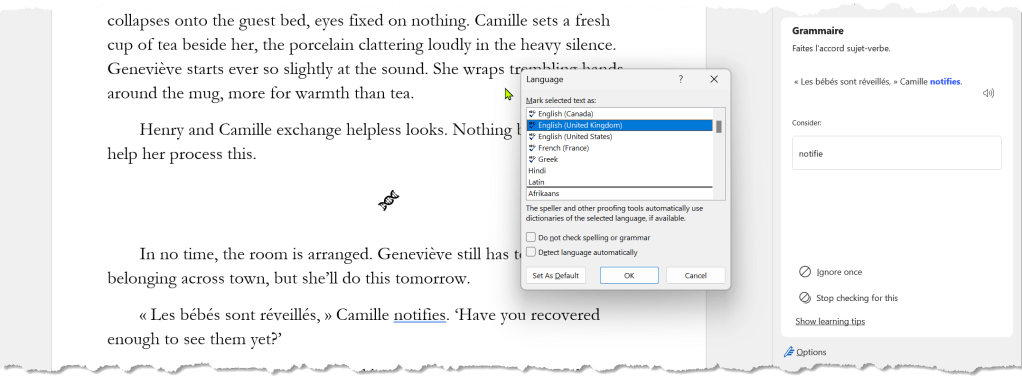
Here is a segment from a chapter from the first draft of Hemo Sapiens: Origin. Notice the last paragraph. I’ve written some dialogue in French with a tag in English. followed by more dialogue in English. This is my attempt to provide guidance to readers who don’t read French, so they can still maintain the context The problem is that Word doesn’t do a great job of accepting language markers. In this case, ‘notifies’ is underlined as being incorrect because Word, despite being informed otherwise, sees this as being French.
I wish I could just highlight a phrase and select the language from a context menu. Up front, I could specify that I am using languages X, Y, and Z, so I am not burdened with a laundry list of language options.
Another interesting thing to me is that there are separate auto-correct dictionaries per language. This makes sense, but it creates a burden to have to signify the language to let Word know which one to use. In my case, I tend to add accented words to autocorrect because I use a standard English-language QWERTY keyboard, and Windows/Word doesn’t make compounding diacritical marks very easy.
For example, a common entry might be ‘bien sûr’ for ‘bien sur’. I also get guillemets « » from << and >>, respectively.
Sadly, the ‘Detect language automatically’ feature isn’t very reliable either, so I leave it unchecked instead of having it misidentify languages.
I just noticed a typo in the screen shot. Word missed that ‘belonging’ should be plural, but probably thinks it’s a verb rather than a noun. Other AI tools make similar semantic errors.
 Ridley Park